0 ratings




Item #:
20359487
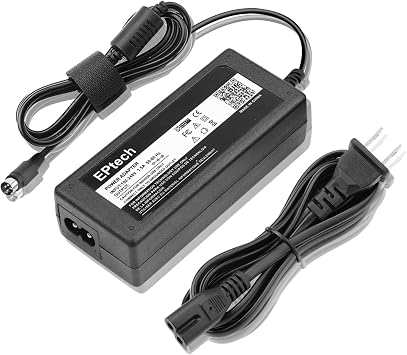
4-Pin AC/DC Adapter for PGB EA11011D-120 Synology DiskStation Network Attached Storage NAS Server, DS918+ DS918 4 Bay Power Supply Cord Cable PS
Item #:
20359487
USD 87
Price Details
Excluding Shipping & Custom charges ( Shipping and custom charges will be calculated on checkout )
*All items will import from US
0 ratings
Write a review
In stock
 Imported from USA store
QTY:
Order now and get it around Wednesday, July 15
Secured transaction
Ubuy works hard to protect your security and privacy. Our advanced payment security system ensures confidentiality by encrypting your information during transmission using AES (Advanced Encryption Standards) and SSL (Secure Socket Layer) protocols. Your payment details are 100% secure as we do not share your payment details with third party sellers.
Our Top Logistics Partners


4-Pin AC/DC Adapter for PGB EA11011D-120 Synology DiskStation Network Attached Storage NAS Server with safety features and highest quality materials.

Fast
Shipping

Free
Return*

Secure Packaging

100% Original Products

PCI DSS Compliance

ISO 27001 Certified


What Stands Out
Versatile Compatibility
Designed specifically for Synology DiskStation models, ensuring seamless integration and reliable performance. This compatibility prevents potential power issues for NAS setups, making it a trusted choice for users.
Reliable Power Supply
Delivers stable and efficient power performance, reducing downtime and enhancing data safety. Users can rely on its consistent output for optimal NAS operation, essential for critical data management.
Quality Construction
Built with high-quality materials for durability and longevity. This adapter withstands everyday wear, promising value for money and ensuring your NAS remains powered for extended periods.
Product Details
- World Wide Input Voltage 100-240VAC 50/60Hz.
- Replacement AC Adapter/Charger ,100% Compatible with the device model listed.
- Charger/Adapter has total 10 Ft Long power cord.
- Safety Features: Over current protection; Total power protection; Over voltage protection; Short Circuit Protection.
- Manufactured with the highest quality materials. Certification: FCC, CE and RoHS.
| Connector Type | barrel connector |
| Compatible Devices | Synology DiskStation NAS Server (DS918+, DS918) |
| Additional Features | Short Circuit Protection |
| Input Voltage | 240 Volts |
| Amperage | 0.25 Amps |
| Wattage | 24 watts |
| Output Current | 0.25 Amps |
| Power Source | Corded Electric |
| Frequency Range | 60 hertz |
| Main Power Connector Type | 4 Pin |
| Portable | No |
| Power Plug | Type A - 2 pin (North American) |
| Current | AC |
| Compatible Power Plug Type | Type A - 2 pin (North American) |
| Mounting Type | Wall Mount |
| Connectivity Technology | Power Cord |
| Brand | EPtech |
| Model Number | A1807266020 |
| Mfr Part Number | A1807266020 |
| Manufacturer | EPtech |
| Number of Items | 1 |
| Item Weight | 8 Ounces (226.8 grams) |
| Unit Count | 1.0 Count |
| Color | Black |
| Specification Met | CE, FCC, RoHS |
| Special Feature | Short Circuit Protection |
Who Should Buy?

-
Home Users
Ideal for individuals using Synology NAS for personal data storage and media management at home.
-
Small Businesses
A perfect solution for small businesses needing reliable power for their Synology DiskStation server.
-
Tech Enthusiasts
Great for tech-savvy users who require consistent performance and power supply for their NAS setups.

-
High-Demand Users
Not suitable for users needing robust power options for high-performance NAS requirements.
-
Incompatible Systems
Users with non-Synology NAS systems will find this adapter ineffective and incompatible.
-
Mobile Users
Not ideal for those who need portable power solutions as it's designed for stationary setups.
Product Description
Have any Query? Chat with us
Customer Questions & Answers
-
Question:
What is a 4-Pin ACDC adapter used for in Synology NAS?
Answer: The 4-Pin ACDC adapter is designed to provide the necessary power to specific Synology DiskStation models such as the DS918 and others in the 4-bay category. This type of adapter ensures a stable and reliable power supply for optimal performance of your NAS server. Without the correct adapter, your Synology device may not function properly, leading to data access issues. Typically, these adapters are essential for users who rely on their NAS for storage, media streaming, and backup solutions. -
Question:
Is the 4-Pin ACDC adapter compatible with all Synology DiskStation models?
Answer: No, the 4-Pin ACDC adapter is specifically compatible with models like the PGB EA11011D-120, which is intended for certain Synology DiskStation network attached storage devices. Always check compatibility with your model to ensure proper functionality. Using the wrong adapter can result in inadequate power supply and potential device malfunctions, negatively impacting your storage and data management needs. -
Question:
How do I install the 4-Pin ACDC adapter on my Synology NAS?
Answer: Installing the 4-Pin ACDC adapter involves connecting the power cord to the designated power input on your Synology DiskStation. It's essential to ensure a secure connection to prevent any power interruptions. After connecting, you can power on your NAS and verify that it functions correctly. This adapter is particularly vital for setups that require consistent uptime, especially in home office or business environments where data reliability is crucial. -
Question:
What are the benefits of using an original 4-Pin ACDC adapter?
Answer: Using an original 4-Pin ACDC adapter ensures that your Synology DiskStation receives the specified voltage and current it requires for optimal performance. Original adapters are tested for compatibility and safety, minimizing the risk of overheating or short-circuiting. This is particularly important in media-intensive applications or when your NAS is used for backup purposes, where data integrity and availability are paramount. -
Question:
Can a generic adapter be used instead of the original 4-Pin ACDC adapter?
Answer: While some generic adapters may fit, it's not advisable to use them instead of the original 4-Pin ACDC adapter. Generic versions might not meet the specific voltage and current requirements of your Synology device, which can lead to malfunction or hardware damage. For users who store critical data or run essential applications on their NAS, sticking to the recommended adapter ensures safety and reliability in performance. -
Question:
What kind of power input does the DS918 require?
Answer: The DS918 requires a steady and stable power input supplied through its designated power socket compatible with the 4-Pin ACDC adapter. This NAS device typically operates on a specific voltage output, which the adapter must match. Ensuring the correct power input will help maintain optimal performance, making it suitable for tasks like data storage, media streaming, and virtual machine hosting. -
Question:
Are there any troubleshooting tips if my NAS is not powering on?
Answer: If your Synology NAS isn’t powering on after connecting the 4-Pin ACDC adapter, check the following: first, confirm that the adapter is securely connected to both the NAS and the power outlet. Next, inspect the power cable for any visible damage. If all appears well, consider testing another outlet to rule out wall outlet issues. These steps are essential, especially for professional users who depend on their NAS for critical data management tasks. -
Question:
What specifications should I look for in a replacement ACDC adapter?
Answer: When searching for a replacement ACDC adapter, ensure it matches the specifications set by Synology for models such as the DS918. Look for the correct voltage, amperage, and pin configuration. It's critical to adhere to these requirements to avoid power-related issues. This detail is particularly important for users engaged in high-usage scenarios, such as media hosting or enterprise-level data management. -
Question:
How can a reliable power supply impact my NAS performance?
Answer: A reliable power supply is fundamental for maintaining smooth operation in your NAS. Inconsistent power can lead to system errors, data corruption, and unexpected downtimes, which are detrimental to both personal and business applications. For users managing extensive data tasks, including file sharing and backups, a stable power source ensures efficiency and uninterrupted service, enhancing overall user experience. -
Question:
Where can I buy a 4-Pin ACDC adapter for Synology NAS in Palau?
Answer: You can purchase the 4-Pin ACDC adapter for the Synology NAS on Ubuy in Palau. Ubuy offers a wide selection of electronics and accessories, ensuring that you can find the right power supply for your Synology DiskStation. Their platform provides detailed product specifications and user reviews to help make informed purchasing decisions tailored to your needs.
EPtech AC Adapters A1807266020 Editorial Review
No editorial reviews found
Customer Reviews & Ratings
16 customers ratings
-
5 Star
61%
-
4 Star
15%
-
3 Star
0%
-
2 Star
0%
-
1 Star
24%
Review this product
Share your thoughts with other customers
Product Price History
Important information
- Limitations : For products shipped internationally, please note that any manufacturer warranty may not be valid; manufacturer service options may not be available; product manuals, instructions, and safety warnings may not be in destination country languages; the products (and accompanying materials) may not be designed in accordance with destination country standards, specifications, and labeling requirements; and the products may not conform to destination country voltage and other electrical standards (requiring use of an adapter or converter if appropriate). The recipient is responsible for assuring that the product can be lawfully imported to the destination country. When ordering from Ubuy or its affiliates, the recipient is the importer of record and must comply with all laws and regulations of the destination country.
- Not all the products listed on Ubuy are for sale, as Ubuy is a global search engine. Products are subject to export/trade regulations.
USD 87
Order now and get it around Wednesday, July 15
This item is not restrict in my country.(Please click on above link if this item is not restrict in your country, So our team will review and allow.)
QTY:
Secured transaction
Ubuy works hard to protect your security and privacy. Our advanced payment security system ensures confidentiality by encrypting your information during transmission using AES (Advanced Encryption Standards) and SSL (Secure Socket Layer) protocols. Your payment details are 100% secure as we do not share your payment details with third party sellers.
Our Top Logistics Partners
Fastest cross-border delivery
Features & Benefits
- World Wide Input Voltage 100-240VAC 50/60Hz.
- Replacement AC Adapter/Charger ,100% Compatible with the device model listed.
- Charger/Adapter has total 10 Ft Long power cord.
- Safety Features: Over current protection; Total power protection; Over voltage protection; Short Circuit Protection.
- Manufactured with the highest quality materials.
- Certification: FCC, CE and RoHS.