- Home Page /
- Electronics /
- Computer Accessories /
- Computer Accessories & Peripherals /
- Input Devices /
- Touch Pads /
- Mini USB Computer Touchpad, Trackpad, Mouse, ...
0 ratings




Item #:
84379985
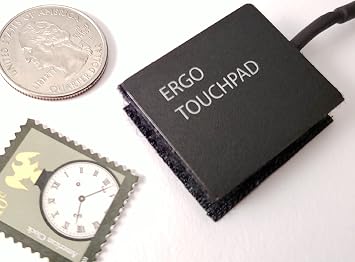
Mini USB Computer Touchpad, Trackpad, Mouse, Wired, 1.1 x 1.3 inches Ergo Touchpad ETP001MTPUSB
Item #:
84379985
USD 79
Price Details
Excluding Shipping & Custom charges ( Shipping and custom charges will be calculated on checkout )
*All items will import from US
0 ratings
Write a review
In stock
 Imported from USA store
QTY:
Only 9 items left in stock.
Order now and get it around Tuesday, June 30
Secured transaction
Ubuy works hard to protect your security and privacy. Our advanced payment security system ensures confidentiality by encrypting your information during transmission using AES (Advanced Encryption Standards) and SSL (Secure Socket Layer) protocols. Your payment details are 100% secure as we do not share your payment details with third party sellers.
Our Top Logistics Partners


The World's Smallest Computer Touchpad, Trackpad, Mouse - compact size, yet packed with functionality.

Fast
Shipping

Free
Return*

Secure Packaging

100% Original Products

PCI DSS Compliance

ISO 27001 Certified


What Stands Out
Compact Design
The Mini USB Touchpad offers a small footprint of just 1.1 x 1.3 inches, ensuring portability and making it ideal for tight spaces or on-the-go use.
Versatile Input
Designed for convenience, this touchpad functions as a mouse and trackpad, seamlessly adjusting to various user preferences and enhancing navigation across devices.
Wired Connectivity
The wired connection provides a reliable and lag-free experience, superior to wireless options, which is crucial for gamers and professionals requiring precision in input.
Product Details
- The Worlds Smallest Computer Touchpad, Trackpad, Mouse 1.1 x 1.3 inches 34.80 mm x 28.25 mm PC, Mac, Apple, Linux, all Brands and Some Tablets
- Wired With Special USB adapter (SEE PHOTO) that converts PS2 to USB, Thin, super stable, secure, robust, water resistant and reliable 6 foot cable,
- All the Functions of a Mouse, Right n Left Click, Scrolling, Double Tap Highlighting and Drag-n-drop, Glide Extend for Unlimited Dragging
- For Everyone from Casual users to Developers, App Makers, Virtual Reality Controls, Automobiles, Accident Victims, Recommended by Physical Therapists
- Capacitive Touch Sensing Means There is No Pressure Needed Just a Feather Lite Touch, Move the Cursor with Ease, No Clicking or Pressing a Button Just a Lite Tap on the Surface for Left Click, Right Click in the Upper Right Corner
| Country of Origin | This item will be imported from US |
| What is in the box | Mini USB Computer Touchpad... For more details, please check description/product details |
Product Technical Details
| Brand | ETPA |
| Hardware Platform | PC, Tablet |
| Operating System | Linux |
| Item Weight | 2.46 ounces |
| Product Dimensions | 1.37 x 1.11 x 0.22 inches |
| Item Dimensions LxWxH | 1.37 x 1.11 x 0.22 inches |
| Power Source | Corded Electric |
| Manufacturer | Ergonomic Touchpad |
Who Should Buy?

-
Traveling Professionals
Ideal for professionals who need a compact pointing device while working on the go with limited space.
-
Minimalist Setups
Perfect for users who prefer clean desk aesthetics and seek a compact, wire-based pointing solution.
-
Accessibility Needs
Beneficial for users with limited mobility as it offers an alternative to traditional larger mouse options.

-
Gaming Enthusiasts
Not suitable for gamers needing high precision and quick response times, lacking in advanced functionalities.
-
Heavy Graphic Users
May not satisfy graphic designers or artists requiring extensive movement range and high sensitivity from their input devices.
-
Multiple-Display Setup
Limited size and functionality make it less effective for users managing multiple monitors or extensive workflow tasks.
Product Description
Have any Query? Chat with us
Customer Questions & Answers
-
Question:
What are the main features of the Mini USB Computer Touchpad?
Answer: The Mini USB Computer Touchpad is designed for portability and comfort, measuring 1.1 x 1.3 inches. Its ergonomic design allows for natural hand positioning, reducing strain during prolonged use. The touchpad supports multi-touch gestures, making it easy to perform actions like scrolling, zooming, and swiping. Additionally, it features a wired connection, ensuring reliable performance without the need for battery replacements. This touchpad is ideal for travel, presentations, or anyone looking for a compact and efficient input device. -
Question:
How do I connect the Mini USB Touchpad to my computer?
Answer: Connecting the Mini USB Computer Touchpad to your computer is straightforward. Simply plug the USB connector into an available USB port on your device. Most systems will automatically recognize the touchpad, enabling immediate functionality. For optimal performance, you may check your computer's settings to customize gesture controls or sensitivity levels. This plug-and-play feature makes it suitable for quick setups in various environments, such as offices, classrooms, or while traveling. -
Question:
Is the touchpad compatible with multiple operating systems?
Answer: Yes, the Mini USB Computer Touchpad is compatible with various operating systems, including Windows, macOS, and Linux. Most computers will recognize the device without needing additional drivers. However, for specific gesture features, you might need to install additional software or drivers depending on your operating system. This broad compatibility makes it a versatile choice for users who use different platforms across devices. -
Question:
Can I use the touchpad for gaming?
Answer: While the Mini USB Touchpad is primarily designed for general computing tasks, it can be used for light gaming. Its responsive surface allows for basic navigation and control in less demanding games. However, it may not provide the precision and speed required for competitive gaming. For gamers who enjoy casual titles or point-and-click adventures, this touchpad offers a comfortable alternative for extended play sessions. -
Question:
What are the benefits of using a wired touchpad?
Answer: Using a wired touchpad like the Mini USB model offers several benefits. First, it provides a consistent and stable connection, eliminating concerns about battery life or wireless interference. Additionally, wired devices typically have lower latency, resulting in faster response times, which can enhance your overall computing experience. This makes the touchpad ideal for professionals who require reliability in their work, such as graphic designers or video editors. -
Question:
Can the touchpad withstand daily wear and tear?
Answer: Yes, the Mini USB Touchpad is built with durability in mind. Its robust construction is designed to handle daily use without compromising performance. The high-quality materials used in its manufacture ensure that it can withstand repeated touches and gestures. This durability makes it suitable for various settings, whether in a bustling office environment or while on the go, ensuring your input device remains functional and reliable. -
Question:
How does the touchpad differ from a traditional mouse?
Answer: The Mini USB Touchpad differs from a traditional mouse primarily in its input method. While a mouse relies on physical movement across a surface, a touchpad uses finger gestures to navigate, offering a different tactile experience. The touchpad's compact design makes it ideal for portable use, while its multi-touch capabilities enable advanced features like pinch-to-zoom. Users who prefer the fluidity of gesture control may find the touchpad to be a more natural and integrated input method for their computing needs. -
Question:
Is the touchpad suitable for left-handed users?
Answer: Yes, the Mini USB Touchpad is suitable for both left-handed and right-handed users. Its symmetrical design allows for comfortable operation regardless of hand preference. Many operating systems also provide the flexibility to customize button functions and settings, so left-handed users can easily adapt the touchpad to suit their needs. This adaptability makes it an inclusive option for a diverse user base. -
Question:
What type of maintenance does the touchpad require?
Answer: The Mini USB Touchpad requires minimal maintenance. Regular cleaning with a soft, lint-free cloth will help keep the surface smooth and responsive. Avoid using harsh chemicals that may damage the touchpad’s finish. Additionally, ensuring your computer’s drivers are up to date will optimize performance and allow you to benefit from any additional features or updates provided by the manufacturer. This low-maintenance aspect makes it a convenient choice for users who prefer hassle-free devices. -
Question:
Where can I buy the Mini USB Computer Touchpad in Palau?
Answer: You can buy the Mini USB Computer Touchpad, Trackpad, Mouse, Wired, 1.1 x 1.3 inches Ergo Touchpad ETP001MTPUSB from Ubuy in Palau. Ubuy offers a variety of electronics and accessories, ensuring a smooth purchasing experience. You can easily find the product on their website by searching for the model name, and benefits such as customer support and detailed product information will help you make an informed decision.
ETPA Touch Pads Editorial Review


The Mini USB Computer Touchpad ETP001MTPUSB has garnered a mixed reception among users, primarily for its unique functionality tailored to niche applications. Reviewers appreciate its compact design and ergonomic advantages, particularly for those experiencing repetitive strain injuries (RSI). Many users have lauded the device's responsiveness and ease of use, indicating a minimal learning curve. The small size of the device allows for seamless integration into various setups, such as in-car technology, enhancing the user experience. However, various concerns have been raised about some design elements. Several users noted the high price point as a drawback, especially Considering the perceived quality of the build and components. The trackpad's USB adapter has also been criticized for being clunky, and the non-detachable cord has been flagged as a potential vulnerability that detracts from portability. Moreover, some users expressed annoyance with the positioning of the logo, and the cord's tendency to get in the way of a flat surface has been a recurring theme in feedback. Overall, while the ETP001MTPUSB fulfills its primary purpose effectively, potential buyers should weigh its ergonomic benefits against its design limitations and price concerns. Enhanced features such as a detachable cord or a weighted mounting solution could significantly elevate the customer experience. **
Customer Reviews & Ratings
10 customers ratings
-
5 Star
70%
-
4 Star
20%
-
3 Star
10%
-
2 Star
0%
-
1 Star
0%
Review this product
Share your thoughts with other customers
Pros
- Ergonomic design, great for those with RSI
- Compact size: ideal for various applications
- Responsive touch sensitivity with minimal learning curve
Cons
- Relatively high price for perceived quality
Product Price History
Important information
- Limitations : For products shipped internationally, please note that any manufacturer warranty may not be valid; manufacturer service options may not be available; product manuals, instructions, and safety warnings may not be in destination country languages; the products (and accompanying materials) may not be designed in accordance with destination country standards, specifications, and labeling requirements; and the products may not conform to destination country voltage and other electrical standards (requiring use of an adapter or converter if appropriate). The recipient is responsible for assuring that the product can be lawfully imported to the destination country. When ordering from Ubuy or its affiliates, the recipient is the importer of record and must comply with all laws and regulations of the destination country.
- Not all the products listed on Ubuy are for sale, as Ubuy is a global search engine. Products are subject to export/trade regulations.
USD 79
Order now and get it around Tuesday, June 30
This item is not restrict in my country.(Please click on above link if this item is not restrict in your country, So our team will review and allow.)
QTY:
Only 9 items left in stock.
Secured transaction
Ubuy works hard to protect your security and privacy. Our advanced payment security system ensures confidentiality by encrypting your information during transmission using AES (Advanced Encryption Standards) and SSL (Secure Socket Layer) protocols. Your payment details are 100% secure as we do not share your payment details with third party sellers.
Our Top Logistics Partners
Fastest cross-border delivery
Features & Benefits
- World's smallest touchpad, measuring just 1.1 x 1.3 inches.
- Compatible with PC, Mac, Apple, Linux, and some tablets.
- Features a robust and water-resistant design with a 6-foot cable.
- Offers all the functionalities of a mouse, including scrolling and drag-n-drop.
- Ideal for casual users, developers, app makers, and more.
- Uses capacitive touch sensing for easy and pressure-free cursor movement.