- Home Page /
- Electronics /
- Computer Accessories /
- Tablet Replacement Parts /
- Batteries /
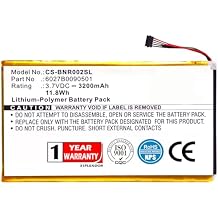
- XPS Replacement battery compatible with BARNE...
0 ratings

Item #:
125660334
XPS Replacement battery compatible with BARNES & NOBLE BNRB200 BNRV200 BNTV250A DR-NK02 Nook 7" NOOK color Nook Tablet PN 6027B0090501
Item #:
125660334
USD 24
Price Details
Excluding Shipping & Custom charges ( Shipping and custom charges will be calculated on checkout )
*All items will import from US
0 ratings
Write a review
In stock
 Imported from USA store
QTY:
Order now and get it around Monday, August 10
Secured transaction
Ubuy works hard to protect your security and privacy. Our advanced payment security system ensures confidentiality by encrypting your information during transmission using AES (Advanced Encryption Standards) and SSL (Secure Socket Layer) protocols. Your payment details are 100% secure as we do not share your payment details with third party sellers.
Our Top Logistics Partners


Professional replacement battery for your E-book and E-reader with certified quality you can trust.

Fast
Shipping

Free
Return*

Secure Packaging

100% Original Products

PCI DSS Compliance

ISO 27001 Certified


What Stands Out
Wide Compatibility
This replacement battery is designed for multiple Nook models, ensuring a seamless fit across devices like BNRB200 and BNTV250A, providing users with a reliable power source.
Enhanced Durability
Engineered for long-lasting performance, this battery withstands daily use, offering consumers an exceptional lifespan and reducing the frequency of replacements.
Quick Installation
Designed for easy installation, this battery allows users to replace their old battery effortlessly, minimizing downtime and getting back to enjoying their Nook devices.
Product Details
| Item Weight | 0.5 lbs (230 grams) |
Dangerous Goods
To avoid the delay in customs clearance process for Dangerous Goods, the shipment shall be opened at our warehouse facility to check the severity of hazardous components. Please see the list of Dangerous goods here.
Who Should Buy?

-
Nook Owners
Ideal for users with Barnes & Noble Nook devices needing reliable battery replacement for extended reading sessions.
-
Frequent Travelers
Great for travelers who rely on their Nook devices for entertainment, requiring a dependable battery for long journeys.
-
Cost-Conscious Users
A budget-friendly option for users wanting to extend their device's lifespan without purchasing a new tablet.

-
Heavy Duty Users
Not suitable for users needing high-performance batteries for intense gaming or heavy application usage beyond standard reading.
Product Description
XPS Replacement battery compatible with BARNES & NOBLE BNRB200 BNRV200 BNTV250A DR-NK02 Nook 7" NOOK color Nook Tablet PN 6027B0090501 AVPB001-A110-01 AVPB003-A110-01 BNA-B002 ENCORE NOOKCOLOR
Have any Query? Chat with us
Customer Questions & Answers
-
Question:
What devices are compatible with the XPS Replacement Battery?
Answer: The XPS Replacement Battery is specifically compatible with several Barnes & Noble devices, including the BNRB200, BNRV200, BNTV250A, DR-NK02, Nook 7", NOOK color, and Nook Tablet, identified by part number 6027B0090501. This compatibility ensures that the battery fits and functions optimally within these devices, prolonging their usability. It's ideal for users looking to maintain or restore their Nook's performance, allowing them to continue enjoying their e-reading experience without interruptions. -
Question:
How do I install the XPS Replacement Battery in my Nook device?
Answer: Installing the XPS Replacement Battery involves a few simple steps. First, ensure your Nook device is powered off. Open the device's battery compartment, and carefully remove the old battery if present. Then, align the new XPS battery correctly with the connectors in the compartment, ensuring a snug fit. Close the compartment securely and power on your device to check if it functions properly. This installation process allows users to quickly replace a depleted battery without needing professional assistance, making it a great DIY solution. -
Question:
How long does the XPS Replacement Battery last?
Answer: The longevity of the XPS Replacement Battery can vary based on usage, but it is designed to deliver consistent performance for regular reading, browsing, and light app usage. On average, users can expect several hours of active use on a full charge. Factors such as screen brightness, Wi-Fi usage, and running background apps can affect battery life. Understanding these factors can help users manage their reading time more effectively, ensuring they can enjoy their Nook without frequent recharges. -
Question:
Is the XPS Replacement Battery safe to use?
Answer: Yes, the XPS Replacement Battery is manufactured with safety in mind, adhering to industry standards to ensure safe operation with your Nook device. It includes built-in protection against overcharging, short-circuiting, and overheating. This design prioritizes user safety, allowing you to charge and use your Nook with confidence. Ensuring that you always use a certified battery for your devices is crucial for maintaining both performance and safety. -
Question:
Where can I buy the XPS Replacement Battery in Palau?
Answer: You can purchase the XPS Replacement Battery compatible with your Barnes & Noble devices on Ubuy in Palau. Ubuy provides a reliable platform for sourcing high-quality electronic components, ensuring you receive a product that meets your needs. With various shopping options, Ubuy simplifies the process of finding essential accessories for your Nook devices, making it easy to get the battery you need to keep your devices running smoothly. -
Question:
Can I use the XPS Replacement Battery while charging?
Answer: Yes, you can use your Nook with the XPS Replacement Battery while it's charging. This reduces downtime and allows you to continue reading or using applications without interruption. However, it is generally recommended to allow the device to charge fully for optimal battery health. Users can better manage their device usage by understanding this feature, balancing between using and charging the device as needed. -
Question:
What are the signs that my Nook battery needs replacement?
Answer: You may notice several signs indicating that your Nook battery requires replacement. Common indicators include a significantly reduced battery life, the device not holding a charge, or unusual swelling of the battery. If you find that your Nook powers off unexpectedly or takes excessively long to charge, these are also signs that the battery performance is diminishing. Identifying these signs early can help users maintain functionality and avoid inconvenience. -
Question:
How can I extend the life of my Nook's battery?
Answer: To extend the life of your Nook's battery, consider using power-saving features, reducing screen brightness, and closing unused apps. Keeping your device updated with the latest software can also enhance efficiency. Additionally, avoid letting your battery drain completely before recharging, as deep discharges can wear out batteries more quickly. Implementing these practices can help users get the most out of their XPS Replacement Battery. -
Question:
What if my Nook does not recognize the new battery?
Answer: If your Nook does not recognize the new XPS Replacement Battery, first ensure that it is installed correctly and securely within the battery compartment. If the installation is correct, try resetting the device by holding down the power button for a few seconds. Should the issue persist, it might be beneficial to check for any software updates that could improve compatibility or reach out to customer support for assistance. Understanding these troubleshooting steps allows users to resolve recognition issues efficiently. -
Question:
Are there any tips for properly disposing of an old battery?
Answer: Yes, it is essential to dispose of old batteries responsibly to prevent environmental harm. Many communities have battery recycling programs or designated drop-off points where you can safely dispose of used batteries. Avoid throwing them in regular trash, as they can leak harmful chemicals. References to local recycling points can help users dispose of their old batteries while supporting eco-friendly practices.
XSPLENDOR Batteries Editorial Review
No editorial reviews found
Customer Reviews & Ratings
1 customers ratings
-
5 Star
100%
-
4 Star
0%
-
3 Star
0%
-
2 Star
0%
-
1 Star
0%
Review this product
Share your thoughts with other customers
Platform Trust & Buyer Confidence

MT
Mohd
Verified buyer
“The product received very good packaging & safe…Thank You”
16 June 2026 · via Trustpilot
SJ
Shawati
Verified buyer
“Accurate delivery timing given”
16 June 2026 · via Trustpilot
YB
Youcef
Verified buyer
“Not madly expensive like I thought, and much quicker than promised.”
15 June 2026 · via Trustpilot
LM
Leila
Verified buyer
“Never dealt with Ubuy before, but everything worked out great. Seamless cross border purchasing and shipping. Thanks!”
6/7/2026 · via Trustpilot
KA
Kwame
Verified buyer
“The process was smooth, with clear communication and timelines. This was my 1st purchase and I am really impressed. I will definitely be coming back.”
12 June 2026 · via Trustpilot
Secure Checkout
Global Delivery
Easy Returns
Genuine Products
Product Price History
Important information
- Limitations : For products shipped internationally, please note that any manufacturer warranty may not be valid; manufacturer service options may not be available; product manuals, instructions, and safety warnings may not be in destination country languages; the products (and accompanying materials) may not be designed in accordance with destination country standards, specifications, and labeling requirements; and the products may not conform to destination country voltage and other electrical standards (requiring use of an adapter or converter if appropriate). The recipient is responsible for assuring that the product can be lawfully imported to the destination country. When ordering from Ubuy or its affiliates, the recipient is the importer of record and must comply with all laws and regulations of the destination country.
- Not all the products listed on Ubuy are for sale, as Ubuy is a global search engine. Products are subject to export/trade regulations.
USD 24
Order now and get it around Monday, August 10
This item is not restrict in my country.(Please click on above link if this item is not restrict in your country, So our team will review and allow.)
QTY:
Secured transaction
PCI DSS compliant and ISO 27001:2022 certified, with encrypted payments and full buyer protection on every order.
Our Top Logistics Partners
Fastest cross-border delivery
Features & Benefits
- Compatible with multiple Nook models including NOOK color and Nook Tablet.
- High capacity of 3200mAh for lasting performance.
- Ensures your E-book and E-reader operates smoothly.
- Certificated with ISO9001, RoHS, and CE for quality assurance.
- Easy purchase with assistance available for compatibility queries.
- Reliable power source to keep your devices running efficiently.
Ubuy Assurance
Experience worry-free shopping with 100% original products, PCI DSS-compliant payment security, ISO 27001-certified data protection, the fastest cross-border delivery, free returns *, and secure packaging on every order.