- Home Page /
- Office Products /
- Office Electronics /
- Printers & Accessories /
- Computer Printers /
- Inkjet Computer Printers /
- Ink Tank Printers /
- Brother INKvestment Tank MFC MFC-J5955DW Wire...
0 ratings




Item #:
78063681
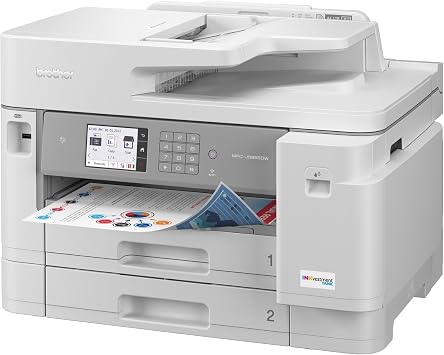
Brother INKvestment Tank MFC MFC-J5955DW Wireless Inkjet Multifunction Printer - Color
Item #:
78063681
USD 852
Price Details
Excluding Shipping & Custom charges ( Shipping and custom charges will be calculated on checkout )
*All items will import from US
0 ratings
Write a review
Out of stock
 Imported from USA store
Secured transaction
Ubuy works hard to protect your security and privacy. Our advanced payment security system ensures confidentiality by encrypting your information during transmission using AES (Advanced Encryption Standards) and SSL (Secure Socket Layer) protocols. Your payment details are 100% secure as we do not share your payment details with third party sellers.
Our Top Logistics Partners


Designed for how work now works. Inkjet all-in-one printer that is ideal for today's corporate home offices and small offices.

Fast
Shipping

Free
Return*

Secure Packaging

100% Original Products

PCI DSS Compliance

ISO 27001 Certified


What Stands Out
Cost-Effective Ink
The INKvestment Tank system significantly reduces ink costs by offering high-capacity cartridges, ensuring lower printing expenses and fewer replacements compared to typical inkjet printers.
Versatile Functionality
This multifunction printer provides printing, scanning, copying, and faxing capabilities, making it an ideal solution for home offices and small businesses with diverse document needs.
Wireless Convenience
With built-in wireless connectivity, users can easily print and scan from mobile devices and computers, promoting efficiency and flexibility in printing tasks without tangled wires.
Product Details
- Ideal for corporate home offices and small offices with fast business color printing
- Low-cost printing with high-yield ink cartridges for cost savings
- 3.5 color touchscreen display for easy navigation and customization of shortcuts
- Flexible paper handling for documents up to 11 x 17 and dual paper trays
- Advanced scanning capabilities including two-sided scanning and versatile connectivity options
- Triple Layer Security, eco-friendly features, and wireless printing for today's remote workforce
| Printer Type | Inkjet |
| Other Special Features of the Product | Auto-Duplex |
| Printer Output Type | Color |
| Item Weight | 51.6 Pounds (23.41 kg) |
| Print media | Paper (plain) |
| Scanner Type | ADF |
| Maximum Copy Speed Black and White | 25 ppm |
| Ink Color | black, cyan, magenta, yellow |
| Additional Printer Functions | Copy, Fax, Scan |
| Control Method | Touch |
| Number of Trays | 3 |
| Processor Count | 1 |
| Resolution | 4800 x 1200 |
| Color Pages per Minute | 30 ppm |
| B&W Pages per Minute | 30 ppm |
| Color | White |
| Color Depth | 24 bpp |
| Maximum print Resolution Color | 4800 x 1200 dpi |
| Maximum Print Resolution Black and White | 4800 |
| Wattage | 3600 |
| Maximum Copy Resolution Color | 600 x 600 dpi |
| Maximum Copy Resolution Black and White | 600 x 600 dpi |
| Brand | Brother |
| Model Name | INKvestment Tank MFC |
| Model Number | MFCJ6955DW |
| Built-In Media | Information Not Available |
| Model Series | INKvestment Tank |
| Specific Uses For Product | Office |
| UPC | 012502665540 |
| Global Trade Identification Number | 04977766818032 |
| Manufacturer | Brother Industries, Ltd |
| Item Type Name | Inkjet Multifunction Printer |
| Unit Count | 1.0 Count |
| Maximum Media Size | Ledger - 11" x 17" |
| Maximum Sheet Capacity | 250 |
| Paper Size | 11 x 17, 8.50 x 11, 8.50 x 14, 7.25 x 10.25, 5.80 x 8.30, 4.10 x 5.80, 3.70 x 9, 4.80 x 9.50, 4.30 x 8.60, 4 x 6, 5 x 7, 5 x 8 Inches (27.9 x 453.4 x 301 cm) |
| Output sheet capacity | 100 |
| Printer Connectivity Type | Networkable, USB, Wireless |
| Hardware Interface | Ethernet, USB 2.0 |
| Dual-sided printing | Yes |
| Duplex | Automatic |
| Connectivity Technology | Networkable, USB, Wireless |
| Printing Technology | Inkjet |
| Special Feature | Auto-Duplex |
| Printer Output | Color |
| Maximum Print Speed (Color) | 30 ppm |
| Max Printspeed Monochrome | 30 ppm |
What's in the box
Information Not Available
Who Should Buy?

-
Small Businesses
Ideal for small enterprises needing reliable, cost-effective printing with high-volume ink tanks for longer use.
-
Home Offices
Perfect for remote workers requiring versatile printing, scanning, copying, and faxing capabilities in a compact design.
-
Educational Institutions
Great for schools that necessitate quality color printing for reports and presentations, maximizing equipment uptime.

-
Frequent Heavy Users
Not suitable for users requiring extremely high print volumes, as it may not match dedicated high-capacity printers.
-
Budget-Conscious Buyers
Individuals seeking the cheapest printing solutions may find better pricing in more basic models without advanced features.
-
Casual Users
Occasional home users who only print infrequently might prefer simpler, less expensive models without multifunction capabilities.
Product Description
Have any Query? Chat with us
Customer Questions & Answers
-
Question:
What are the main features of the Brother INKvestment Tank MFC-J5955DW printer?
Answer: The Brother INKvestment Tank MFC-J5955DW is a versatile wireless inkjet multifunction printer that offers printing, scanning, copying, and faxing capabilities. It features INKvestment Tank technology which allows for high-volume printing with less frequent ink replacements. Additionally, it supports mobile printing options like AirPrint and Google Cloud Print, and has a robust paper handling capacity with a 250-sheet paper tray. This makes it ideal for home offices and small businesses that require efficient multitasking, quick printing, and reliable wireless connectivity. -
Question:
Is the Brother MFC-J5955DW suitable for high-volume printing?
Answer: Yes, the Brother MFC-J5955DW is specifically designed for high-volume printing due to its INKvestment Tank system that provides larger ink cartridges, enabling longer printing sessions before needing a refill. This feature significantly reduces the cost per page, making it a cost-effective option for businesses that frequently print documents. Scenarios like printing marketing materials or bulk reports can be efficiently managed with this printer, ensuring that users spend less time on maintenance and more on productivity. -
Question:
How do I set up the Brother MFC-J5955DW printer wirelessly?
Answer: Setting up the Brother MFC-J5955DW Wirelessly is straightforward. Begin by connecting the printer to your Wi-Fi network through the printer's control panel. You can select the Network option and follow the on-screen instructions to enter your Wi-Fi credentials. For optimal performance, download the Brother iPrint&Scan app to configure the printer further and enable mobile printing capabilities. This capability is perfect for users who need to print from various devices, including smartphones and tablets, facilitating a flexible work environment. -
Question:
What type of ink does the Brother MFC-J5955DW use?
Answer: The Brother MFC-J5955DW utilizes Brother's INKvestment Tank system which incorporates super high-yield ink cartridges. This allows users to enjoy more prints per cartridge, reducing the frequency of ink replacement. You can find black, cyan, magenta, and yellow cartridges designed specifically for this printer model. This type of ink is best suited for both high-volume and everyday printing needs, providing vibrant colors and sharp text, ideal for home office documents or professional presentations. -
Question:
Can the Brother MFC-J5955DW print on different paper sizes?
Answer: Yes, the Brother MFC-J5955DW is equipped to handle various paper sizes, including A4, A5, A6, Letter, and Legal formats. This versatility allows users to print a range of materials from standard documents to envelopes and labels. The multiple trays can be set up for different paper sizes, which is practical for businesses that need to switch between printing invoices and marketing materials without manual adjustments, enhancing workflow efficiency. -
Question:
Does the printer support duplex printing?
Answer: Absolutely, the Brother MFC-J5955DW features automatic duplex printing, allowing users to print on both sides of the paper without manual intervention. This not only saves paper but is also an eco-friendly choice, ideal for those looking to minimize waste in an office environment. It is especially beneficial for producing double-sided reports or presentations without the hassle of flipping each page, making it a convenient option for educators, students, and business professionals. -
Question:
What operating systems are compatible with the MFC-J5955DW?
Answer: The Brother MFC-J5955DW is compatible with various operating systems, including Windows and macOS, as well as mobile operating systems like iOS and Android for mobile printing. This compatibility ensures that users can easily integrate the printer into their existing setups regardless of device. Additionally, companies that use diverse systems can confidently rely on this printer without worrying about software conflicts, streamlining the printing process across different user environments. -
Question:
How can I maintain the Brother MFC-J5955DW printer?
Answer: Maintaining the Brother MFC-J5955DW involves regular cleaning, checking ink levels, and updating the firmware to ensure optimal performance. It is advisable to clean the print heads and check for any paper jams regularly. The user-friendly control panel provides alerts for maintenance tasks. Regular maintenance is essential, especially in high-volume environments, to prevent downtimes and ensure consistent print quality, perfect for businesses that rely heavily on printed materials. -
Question:
What is the printing speed of the Brother MFC-J5955DW?
Answer: The printing speed of the Brother MFC-J5955DW can reach up to 20 pages per minute for both black and color documents, depending on the print settings. This speed makes it an excellent choice for environments where efficiency is key, such as busy offices or educational institutions. Users who regularly print large volumes of documents will appreciate the swift output, allowing them to manage their time effectively and increase productivity. -
Question:
Where can I buy the Brother MFC-J5955DW in Palau?
Answer: You can purchase the Brother INKvestment Tank MFC-J5955DW Wireless Inkjet Multifunction Printer from Ubuy, a reputable online shopping platform in Palau. Ubuy offers a seamless shopping experience with various delivery options, ensuring that you receive your printer promptly. They cater to customers looking for high-quality products and often have special deals and offers, making it a reliable choice for buying this multifunction printer.
Brother Ink Tank Printers MFCJ6955DW Editorial Review
In reviewing the customer experiences regarding this printer model, it becomes evident that user satisfaction is varied. Some customers praised the printer for its simplicity and cost-effectiveness, particularly highlighting that the ink is not expensive and that the machine is easy to use. This sentiment reflects a positive view of its functionality for everyday printing needs. However, several significant issues have been noted, particularly concerning installation and compatibility. A user expressed frustration with the setup process, stating that despite being tech-savvy, they encountered numerous errors while trying to install drivers, rendering the printer unusable. This has raised concerns about the reliability of the installation process, which seems to hinder a smooth user experience. Additionally, a former user of an earlier model pointed out a notable limitation with the newer version: the inability to scan larger documents, specifically 11x17 sizes. This Constraint has been viewed as a significant downgrade, especially for users who relied on this feature for comprehensive tasks like markup and scanning of drawings. Overall, while the printer works well for basic functions, it may not meet everyone's needs, especially for those requiring advanced features like larger document scanning. **
Customer Reviews & Ratings
35 customers ratings
-
5 Star
40%
-
4 Star
23%
-
3 Star
7%
-
2 Star
7%
-
1 Star
23%
Review this product
Share your thoughts with other customers
Pros
- Easy to use
- Affordable ink prices
- Satisfactory performance for everyday printing
Cons
- Inability to scan larger documents (11x17)
Product Price History
Important information
- Limitations : For products shipped internationally, please note that any manufacturer warranty may not be valid; manufacturer service options may not be available; product manuals, instructions, and safety warnings may not be in destination country languages; the products (and accompanying materials) may not be designed in accordance with destination country standards, specifications, and labeling requirements; and the products may not conform to destination country voltage and other electrical standards (requiring use of an adapter or converter if appropriate). The recipient is responsible for assuring that the product can be lawfully imported to the destination country. When ordering from Ubuy or its affiliates, the recipient is the importer of record and must comply with all laws and regulations of the destination country.
- Not all the products listed on Ubuy are for sale, as Ubuy is a global search engine. Products are subject to export/trade regulations.
USD 852
Currently unavailable.
We don't know when or if this item will be back in stock.
This item is not restrict in my country.(Please click on above link if this item is not restrict in your country, So our team will review and allow.)
Secured transaction
Ubuy works hard to protect your security and privacy. Our advanced payment security system ensures confidentiality by encrypting your information during transmission using AES (Advanced Encryption Standards) and SSL (Secure Socket Layer) protocols. Your payment details are 100% secure as we do not share your payment details with third party sellers.
Our Top Logistics Partners
Fastest cross-border delivery