- Home Page /
- Electronics /
- Computer Accessories /
- Tablet Replacement Parts /
- Screens /
- 12.9" Screen Replacement for iPad Pro 12.9 3r...
0 ratings


Item #:
113447898
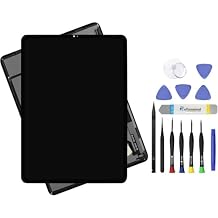
12.9" Screen Replacement for iPad Pro 12.9 3rd Gen A1876 A2014 A1983 A1895 and 4th Gen A2069 A2232 A2233 A2229 LCD Display + Glass Touch Digitizer
82% of respondents would recommend this to a friend
Item #:
113447898
USD 185
Price Details
Excluding Shipping & Custom charges ( Shipping and custom charges will be calculated on checkout )
*All items will import from US
0 ratings
Write a review
In stock
 Imported from USA store
QTY:
Order now and get it around Friday, September 11
Secured transaction
Ubuy works hard to protect your security and privacy. Our advanced payment security system ensures confidentiality by encrypting your information during transmission using AES (Advanced Encryption Standards) and SSL (Secure Socket Layer) protocols. Your payment details are 100% secure as we do not share your payment details with third party sellers.
Our Top Logistics Partners


Every screen is a complete assembly with both the LCD Display and Glass Touch Digitizer for a much easier repair.

Fast
Shipping

Free
Return*

Secure Packaging

100% Original Products

PCI DSS Compliance

ISO 27001 Certified



What Stands Out
High Compatibility
Designed specifically for iPad Pro 12.9 3rd and 4th Generation models, ensuring a perfect fit and seamless functionality with original parts.
Complete Repair Kit
Includes all necessary tools for DIY repair, empowering users to restore their device without professional assistance, saving time and money.
Quality Assurance
Manufactured with high-quality LCD and glass materials, providing reliable performance and durability, making it an excellent value for long-term use.
Product Details
| Package Dimensions | 14.25 x 10.55 x 1.73 inches (36.2 x 26.8 x 4.4 cm) |
| Item Weight | 2 pounds (910 grams) |
| Manufacturer | ARUISIFX |
| Item model number | 12.9-pro3 |
| Date First Available | February 10, 2023 |
Who Should Buy?

-
DIY Repair Enthusiasts
Ideal for users who enjoy hands-on projects and have experience repairing electronic devices like iPads.
-
Cost-Conscious Users
Perfect for those looking to save money by replacing their iPad screen instead of purchasing a new device.
-
iPad Pro Owners
Beneficial for owners of compatible iPad Pro models needing a reliable screen replacement for extensive use.

-
Beginners
Not suitable for users with little to no experience in repairing electronic devices, as it requires technical skills.
Product Description
12.9" Screen Replacement for iPad Pro 12.9 3rd Gen A1876 A2014 A1983 A1895 and 4th Gen A2069 A2232 A2233 A2229 LCD Display + Glass Touch Digitizer Assembly + Repair Kit
Have any Query? Chat with us
Customer Questions & Answers
-
Question:
What models are compatible with the 12.9 Screen Replacement for iPad Pro?
Answer: This screen replacement is specifically designed for the iPad Pro 12.9 models, including the 3rd Generation (A1876, A2014, A1983, A1895) and the 4th Generation (A2069, A2232, A2233, A2229). Whether your device has encountered cracks or unresponsive touch features, this replacement ensures your iPad can function seamlessly. Knowing your model number is crucial; you can usually find it on the back of the device. This makes it ideal for restoring usability in educational or professional environments where the iPad is essential. -
Question:
How do I install the 12.9 Screen Replacement for iPad Pro?
Answer: Installing the screen replacement requires some technical skills and tools, including a heat gun, suction cup, and precision screwdrivers. First, power off the device and gently heat the edges to soften the adhesive. Use the suction cup to lift the display and carefully disconnect the connectors. Follow a step-by-step guide to ensure you replace the screen without causing damage. Precise installation is crucial, as improper handling could affect display performance. This is often suitable for tech enthusiasts or individuals familiar with iPad repairs wishing to save on repair costs. -
Question:
What tools are needed to replace the screen?
Answer: To successfully replace the 12.9 screen on an iPad Pro, you will need a toolkit including a heat gun or hairdryer, a suction cup, precision screwdrivers (like a pentalobe and Phillips), and plastic pick tools for prying. Using these tools ensures you're able to safely separate the glass from the body of the iPad without causing damage. Having the right tools on hand also streamlines the repair process, making it suitable for those tackling DIY repairs or professionals in mobile device repair. -
Question:
What should I do if my iPad screen is unresponsive?
Answer: If your iPad Pro's screen is unresponsive, this could be due to a hardware malfunction or software glitch. Initially, try force-restarting the device to see if responsiveness returns. If the issue persists, it may indicate a damaged LCD or digitizer, warranting screen replacement. This is particularly important in working environments where devices are frequently used, as a functioning screen is essential for efficient productivity. Choosing to replace the screen can restore your device’s functionality and extend its lifespan. -
Question:
Will the replacement screen maintain original display quality?
Answer: Yes, the 12.9 screen replacement is designed to match the original display quality of the iPad Pro. This includes maintaining the resolution, brightness, and color accuracy, ensuring a seamless viewing experience similar to the factory-installed screen. Restoring your iPad with a high-quality replacement is vital, especially for graphic designers or video editors who rely on precise visuals. Maintaining display quality contributes significantly to user satisfaction and device performance after repairs. -
Question:
How can I identify a genuine screen replacement?
Answer: To identify a genuine screen replacement for the iPad Pro 12.9, look for markers such as the manufacturer's branding, product specifications, and customer reviews. Genuine parts usually come with detailed installation instructions and additional quality assurances. Scrutinising the product's packaging and verifying the seller's credibility can also help ensure authenticity. This diligence is important for anyone looking to maintain high functionality in their device, particularly in environments where reliability is paramount. -
Question:
Can I perform the replacement myself or should I seek professional help?
Answer: Deciding between DIY replacement or professional help depends on your technical skills and comfort level. If you have prior experience in electronic repairs, performing the replacement yourself can save costs and be a fulfilling project. However, if you're unsure or lack the necessary tools, enlisting a professional can ensure a high-quality fix without the risk of damaging your device further. This is especially recommended for users who rely heavily on their iPads for work or study, where downtime needs to be minimized. -
Question:
What is the difference between digitizer and LCD screen replacements?
Answer: The digitizer and LCD are two separate components of the iPad screen. The digitizer is the layer that senses touch, while the LCD is responsible for displaying images. In a screen replacement, both components are often integrated, but issues may arise with just one. It's essential to diagnose whether the problem lies with the digitizer or the LCD to choose the appropriate replacement. This knowledge helps users make informed decisions, particularly for those who experience touch responsiveness issues or display anomalies. -
Question:
What should I do with a cracked iPad Pro screen?
Answer: If your iPad Pro screen is cracked, it's advisable to replace it as soon as possible to prevent further damage and maintain usability. Continuing to use a cracked screen can lead to deeper issues, including impaired touch functionality or internal damage. Assessing the severity of the crack is essential; if it affects usability, replacing it becomes a priority. This is especially crucial in professional settings where reliable performance is essential, fostering a proactive approach to device maintenance. -
Question:
Where can I buy 12.9 Screen Replacement for iPad Pro 12.9 3rd Gen and 4th Gen?
Answer: You can buy the 12.9 Screen Replacement for iPad Pro 12.9 3rd Gen and 4th Gen from Ubuy in Palau. Ubuy offers a wide range of replacement parts, ensuring quality and compatibility with your device. It's a convenient option for those looking to restore their iPads, as Ubuy provides a user-friendly shopping experience and detailed product descriptions to help you make the right choice. This is particularly beneficial for customers who value trust and quality in their purchases.
ARUISIFX Screens 12.9-pro3 Editorial Review
The 12.9" Screen Replacement for the iPad Pro (3rd and 4th Gen) has garnered a mixed but generally positive reception from users looking to restore their devices. Customers have found this replacement screen to be easy to install, which is a significant advantage for DIY enthusiasts and those looking to save on repair costs. One user noted that while their husband's assessment suggested a slight difference in clarity compared to the original screen, another user couldn’t detect any such difference. However, not all experiences have been flawless. One customer reported receiving a defective display initially, which left them with concerns. Fortunately, customer service proved effective, with the seller providing a replacement swiftly, resulting in a functioning product that met their needs. This aspect highlights the seller's commitment to customer satisfaction. A concern raised by some users was related to the adhesive included with the kit, which reportedly did not hold as well as expected, necessitating a separate purchase of glue. This could be a potential hurdle for those less experienced with tech repairs. Overall, the product tends to satisfy customers who value ease of installation and responsive customer service, though minor quality and adhesive concerns may detract from overall satisfaction. **
Customer Reviews & Ratings
1 customers ratings
-
5 Star
100%
-
4 Star
0%
-
3 Star
0%
-
2 Star
0%
-
1 Star
0%
Review this product
Share your thoughts with other customers
Pros
- Easy installation process.
- Generally good performance after successful installation.
Cons
- Some users noted a slight clarity difference compared to original screens.
Platform Trust & Buyer Confidence

MA
Mohammad
Verified buyer
“Excellent quality and original too,when ubuy send original things I will appreciate that ,I very satisfied thank you”
23 July 2026 · via Trustpilot
CK
Chitra
Verified buyer
“The order and delivery progress was communicated very well. Package arrived within the estimated time. Products arrived as expected in good condition.”
22-Jul-26 · via Trustpilot
K
kund
Verified buyer
“Good supply of products. Safe payment methods, and shipment worldwide! Genuine products.”
23-Jul-26 · via Trustpilot
OO
Onesi
Verified buyer
“Was my first time buying a product from Ubuy, but I found it so helpful. This is reliable. Gonna place a new order!”
22 July 2026 · via Trustpilot
SJ
SAO JOHN
Verified buyer
“Ubuy is a great online platform to buy stuff. Reliable, fast delivery time and great value for money. I've been using Ubuy online shopping platform for three years now and will continue to do so.”
23 July 2026 · via Trustpilot
Secure Checkout
Global Delivery
Easy Returns
Genuine Products
Product Price History
Important information
- Limitations : For products shipped internationally, please note that any manufacturer warranty may not be valid; manufacturer service options may not be available; product manuals, instructions, and safety warnings may not be in destination country languages; the products (and accompanying materials) may not be designed in accordance with destination country standards, specifications, and labeling requirements; and the products may not conform to destination country voltage and other electrical standards (requiring use of an adapter or converter if appropriate). The recipient is responsible for assuring that the product can be lawfully imported to the destination country. When ordering from Ubuy or its affiliates, the recipient is the importer of record and must comply with all laws and regulations of the destination country.
- Not all the products listed on Ubuy are for sale, as Ubuy is a global search engine. Products are subject to export/trade regulations.
USD 185
Order now and get it around Friday, September 11
This item is not restrict in my country.(Please click on above link if this item is not restrict in your country, So our team will review and allow.)
QTY:
Secured transaction
PCI DSS compliant and ISO 27001:2022 certified, with encrypted payments and full buyer protection on every order.
Our Top Logistics Partners
Fastest cross-border delivery
Features & Benefits
- Complete replacement assembly for easy installation.
- Compatible with iPad Pro 12.9 3rd and 4th Gen models.
- Includes premium repair tools for safe and effective installation.
- Fixes a variety of screen issues including touch and display problems.
- High-quality components ensure durability and performance.
- Factory tested for reliability and easy operation.
Ubuy Assurance
Experience worry-free shopping with 100% original products, PCI DSS-compliant payment security, ISO 27001-certified data protection, the fastest cross-border delivery, free returns *, and secure packaging on every order.