- Home Page /
- Office Products /
- Office Electronics /
- Printers & Accessories /
- Printer Parts & Accessories /
- Printer Trays & Drawers /
- Printer Trays /
- Paper Output Tray Replacement Part Replacemen...
0 ratings






Item #:
144019356
Paper Output Tray Replacement Part Replacement for HP OfficeJet Pro 9010 9012 9015 9016 9019 9018 9010E 9013E 9015E 9016E 9018E 9110B 9125E (Only
Item #:
144019356
USD 48
Price Details
Excluding Shipping & Custom charges ( Shipping and custom charges will be calculated on checkout )
*All items will import from US
4%
0 ratings
Write a review
In stock
 Imported from USA store
QTY:
Order now and get it around Tuesday, July 14
Secured transaction
Ubuy works hard to protect your security and privacy. Our advanced payment security system ensures confidentiality by encrypting your information during transmission using AES (Advanced Encryption Standards) and SSL (Secure Socket Layer) protocols. Your payment details are 100% secure as we do not share your payment details with third party sellers.
Our Top Logistics Partners


Easy to install: Just remove the old paper tray and install the new one, as well as plug and play directly.

Fast
Shipping

Free
Return*

Secure Packaging

100% Original Products

PCI DSS Compliance

ISO 27001 Certified


What Stands Out
Compatible Design
Precisely designed for HP OfficeJet Pro series, ensuring seamless integration and reliable performance without compromising printer functionality or quality.
Easy Installation
User-friendly installation process that allows for quick replacement, minimizing downtime and maximizing productivity in busy office environments.
Durable Materials
Constructed from high-quality materials to enhance longevity and withstand regular use, providing exceptional value and cost-effectiveness for office maintenance.
Product Details
- Product name: Phyxlyn paper delivery tray output tray compatible with HP printer tray
- Printer Paper Tray Compatible with: HP OfficeJet Pro 9010 9012 9015 9016 9019 9018 9010E 9013E 9015E 9016E 9018E 9110B 9125E printer
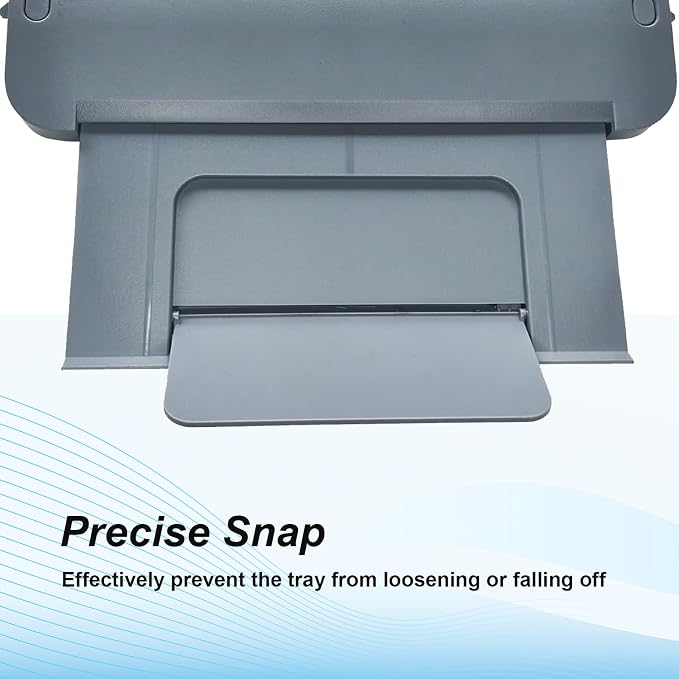
- High quality: Outgoing trays are made of superior materials and upgraded craftsmanship
- Easy to install: Just remove the old paper tray and install the new one, as well as plug and play directly, effectively solves paper jam and paper pickup problems
- Please check the compatibility of your printer model before purchasing
Product Technical Details
| Manufacturer | Phyxlyn |
| Brand | Phyxlyn |
| Item Weight | 8.9 ounces |
| Package Dimensions | 10.25 x 6.5 x 1 inches |
| Color | Paper Output Tray |
| Manufacturer Part Number | PH-ANA70 |
Who Should Buy?

-
Office Users
Ideal for office environments where printer output trays frequently break or wear out due to heavy usage.
-
Home Offices
Great for home office setups that require reliable printing capabilities without the need to buy a new printer.
-
Small Businesses
Useful for small businesses seeking cost-effective solutions to maintain their HP OfficeJet Pro printers.

-
Casual Users
Not suitable for users who print infrequently and do not deal with output tray issues regularly.
-
Non-HP Printers
Incompatible with printers other than the specified HP OfficeJet Pro models; will not fit other brands.
-
High-Volume Printers
Not ideal for heavy print users who may require more robust printing solutions and accessories.
Product Description
Have any Query? Chat with us
Customer Questions & Answers
-
Question:
What is the purpose of the Paper Output Tray Replacement for HP OfficeJet Pro models?
Answer: The Paper Output Tray Replacement is designed to catch and hold printed pages from your HP OfficeJet Pro printer models. This part ensures that your documents do not fall to the floor after printing, maintaining a clean workspace and organized printed materials. Additionally, it aids in preventing smudging and misalignment during the printing process, as it is precisely designed to fit various OfficeJet Pro models. -
Question:
Which HP OfficeJet Pro models does the Paper Output Tray fit?
Answer: This replacement part fits a variety of HP OfficeJet Pro models including 9010, 9012, 9015, 9016, 9019, 9018, as well as the newer 9010E, 9013E, 9015E, 9016E, 9018E, and 9110B, 9125E. This wide compatibility makes it a versatile choice for users seeking to replace their malfunctioning or damaged output trays and ensures sustained performance across different models. -
Question:
How do I know if I need a replacement for my output tray?
Answer: Indications that you may need a new output tray include visible damage, such as cracks or missing parts, difficulty in retrieving printed pages, or a compromised fit that fails to hold printed documents securely. If you notice that your prints are landing outside the tray or if the tray cannot be attached correctly, replacing the output tray can improve your printing experience. -
Question:
Can I install the Paper Output Tray Replacement myself?
Answer: Yes, installing the Paper Output Tray Replacement is a straightforward process that typically involves removing the old tray and replacing it with the new one. No special tools are needed, making it accessible even for those who may not have technical experience. This means you can quickly restore functionality to your printer without requiring professional help. -
Question:
Is the Paper Output Tray Replacement compatible with third-party ink or paper brands?
Answer: Yes, the Paper Output Tray Replacement is designed to work seamlessly with both HP and third-party ink and paper brands. However, using high-quality supplies is recommended to prevent any printing issues and ensure optimal performance. This compatibility enhances the versatility of your printing setup, making the tray suitable for a wide range of printing needs. -
Question:
Where can I find replacement parts for HP OfficeJet Pro printers?
Answer: You can purchase the Paper Output Tray Replacement for HP OfficeJet Pro models from various online retailers. For users in Palau, Ubuy is a reliable option where you can find this specific part along with other accessories for your printer. -
Question:
What materials is the output tray made from?
Answer: The Paper Output Tray Replacement is typically made from high-quality plastic that is durable and designed to withstand the daily wear and tear associated with printing. This material choice promotes longevity and ensures that the tray will maintain its shape and function over time, ensuring it can support numerous print jobs without faltering. -
Question:
How can I maintain my output tray for longer life?
Answer: Maintaining your output tray involves periodic cleaning to remove dust and debris while ensuring it is properly aligned when installed. Avoid overloading the tray with excess paper, which can lead to bending or breaking. By taking these simple steps, you can prolong the life of your output tray and ensure it continues to function effectively with your HP OfficeJet Pro printer. -
Question:
Can I use the printer without the output tray?
Answer: While technically you can operate the printer without the output tray, it is not recommended as it can lead to disorganized printing outputs and may result in paper jams or misalignment. The output tray plays a crucial role in collecting and organizing your printed pages, ensuring they don't fall on the floor and that the printing process runs smoothly. -
Question:
What should I do if my output tray breaks again?
Answer: If your output tray breaks again, the best course of action is to assess the root cause of the damage, such as overloading the tray or mishandling it during operation. Addressing any underlying issues will help prevent future breaks. When a replacement is necessary, consider regularly checking for wear and tear to ensure that you can act quickly and minimize disruption to your printing tasks.
Phyxlyn Printer Trays Editorial Review



No editorial reviews found
Customer Reviews & Ratings
2 customers ratings
-
5 Star
100%
-
4 Star
0%
-
3 Star
0%
-
2 Star
0%
-
1 Star
0%
Review this product
Share your thoughts with other customers
Platform Trust & Buyer Confidence

MT
Mohd
Verified buyer
“The product received very good packaging & safe…Thank You”
16 June 2026 · via Trustpilot
SJ
Shawati
Verified buyer
“Accurate delivery timing given”
16 June 2026 · via Trustpilot
YB
Youcef
Verified buyer
“Not madly expensive like I thought, and much quicker than promised.”
15 June 2026 · via Trustpilot
LM
Leila
Verified buyer
“Never dealt with Ubuy before, but everything worked out great. Seamless cross border purchasing and shipping. Thanks!”
6/7/2026 · via Trustpilot
KA
Kwame
Verified buyer
“The process was smooth, with clear communication and timelines. This was my 1st purchase and I am really impressed. I will definitely be coming back.”
12 June 2026 · via Trustpilot
Secure Checkout
Global Delivery
Easy Returns
Genuine Products
Product Price History
Important information
- Limitations : For products shipped internationally, please note that any manufacturer warranty may not be valid; manufacturer service options may not be available; product manuals, instructions, and safety warnings may not be in destination country languages; the products (and accompanying materials) may not be designed in accordance with destination country standards, specifications, and labeling requirements; and the products may not conform to destination country voltage and other electrical standards (requiring use of an adapter or converter if appropriate). The recipient is responsible for assuring that the product can be lawfully imported to the destination country. When ordering from Ubuy or its affiliates, the recipient is the importer of record and must comply with all laws and regulations of the destination country.
- Not all the products listed on Ubuy are for sale, as Ubuy is a global search engine. Products are subject to export/trade regulations.
USD 48
Order now and get it around Tuesday, July 14
This item is not restrict in my country.(Please click on above link if this item is not restrict in your country, So our team will review and allow.)
QTY:
Secured transaction
PCI DSS compliant and ISO 27001:2022 certified, with encrypted payments and full buyer protection on every order.
Our Top Logistics Partners
Fastest cross-border delivery
Features & Benefits
- Compatible with various HP OfficeJet Pro models.
- Made from superior materials for durability.
- Upgraded craftsmanship ensures reliable performance.
- Easy installation process: just plug and play.
- Effectively resolves paper jam and pickup issues.
- Enhance your printing experience with high-quality output.
Ubuy Assurance
Experience worry-free shopping with 100% original products, PCI DSS-compliant payment security, ISO 27001-certified data protection, the fastest cross-border delivery, free returns *, and secure packaging on every order.